Web Event
Web Event : object
| Parámetros | Tipo | Descripción | |
|---|---|---|---|
| Resultado | Object | ← | Información sobre el evento activado |
Historia
| Lanzamiento | Modificaciones |
|---|---|
| 21 | Añadidos |
Descripción
Web Event devuelve un objeto con información sobre un evento desencadenado vinculado a un componente de página web.
El comando debe ser llamado en el contexto de una página web manejada por el servidor web de 4D.
Resultado
El objeto devuelto contiene las siguientes propiedades:
| Propiedad | Tipo | Descripción | |
|---|---|---|---|
| caller | string | Referencia servidor del componente que desencadena el evento | |
| eventType | string | Tipo de evento:Page se carga | |
| data | object | Información adicional en función del componente implicado | |
| index | number | ||
| row | number | Componente de la tabla de datos: número de línea | |
| name | string | Componente Data Table: nombre qodlysource de la columna (por ejemplo, "firstname", "address.city") |
Ejemplo
El objetivo es mostrar/ocultar un texto de ayuda cuando el usuario pasa el ratón sobre el componente:

Esto se hace adjuntando los eventos onmouseenter y onmouseleave a un componente Text input que muestra la información almacenada en un componente Text (mostrando "This is the help text").
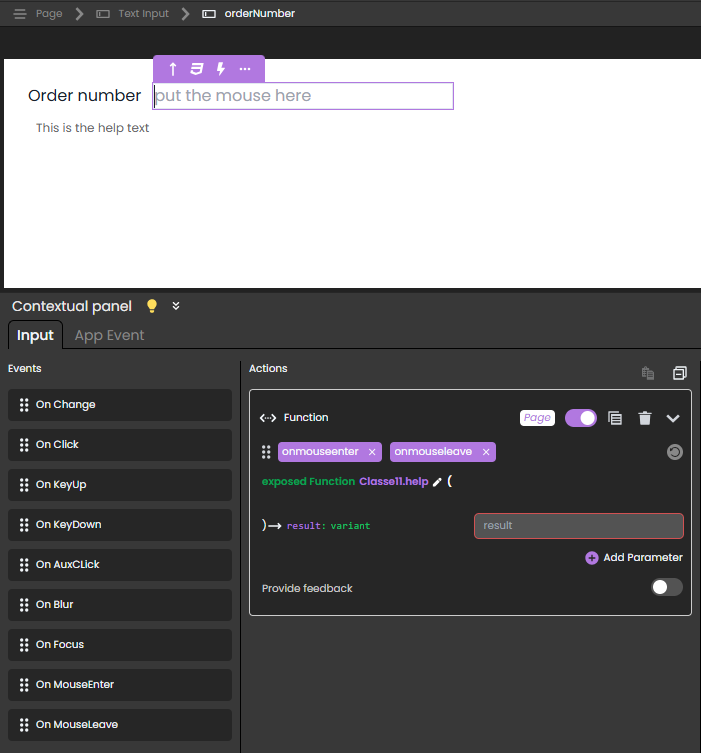
En este escenario:
- El componente Text input tiene
orderNumbercomo referencia servidor.
- El componente Texto tiene
helpOn_orderNumbercomo referencia del lado Servidor.
- La función exposed
help()se adjunta a los eventosonmouseenteryonmouseleavey contiene el siguiente código:
shared singleton Class constructor()
exposed Function help()

	var event : Object
	var myForm : 4D.WebForm
	var componentRef : Text

	myForm:=web Form
	event:=web Event
	componentRef:=event.caller

	Case of
		: (event.eventType="onmouseenter") // el evento es onmouseenter
			myForm["helpOn_"+componentRef].show() // mostrar la ayuda en "orderNumber" mostrando
			// el componente texto con referencia "helpOn_orderNumber"
		: (event.eventType="onmouseleave") // el evento es onmouseleave
			myForm["helpOn_"+componentRef].hide() // ocultar la ayuda sobre orderNumber

	End case
Para abrir la página web con la ayuda de orderNumber oculta, puede asociar esta función al evento onload de la página web:
exposed function hideOnLoad()
	webForm.helpOn_orderNumber.hide()
Ver también
Web Form
WebForm class
WebFormItem class
Propiedades
| Número de comando | 1734 |
| Hilo seguro | no |