デスクトップセッション
概要
デスクトップセッションとは、4D Server、4Dリモートまたは 4Dシングルユーザー版のユーザー関連の実行コンテキストのうち、Web やREST アクセスに起因するものではないものです。
デスクトップセッションには以下のような種類が含まれます:
- リモートユーザー セッション: クライアント/サーバーアプリケーションでは、リモートユーザーは、クライアントおよびサーバーから管理される独自のセッションを持ちます。
- ストアドプロシージャーセッション: クライアント/サーバーアプリケーションにおいては、サーバー上で実行される全てのストアドプロシージャーを管理する固有のバーチャルユーザーセッション。
- スタンドアロンセッション: シングルユーザーアプリケーション内で返されるローカルセッションオブジェクト(クライアント/サーバーアプリケーションの開発およびテストフェーズにおいて有用です)。
以下の図は、異なるセッションの種類とそれらがどのように関連するかを表しています:
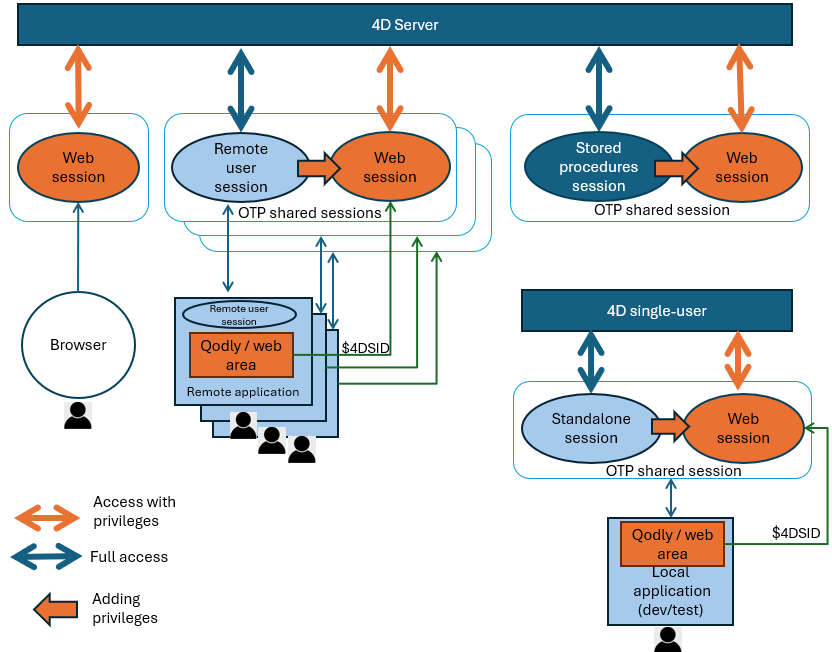
Web ユーザーセッション 同様、デスクトップセッションで実行されたコードはSession オブジェクトへのアクセスが可能で、これによって提供される関数やプロパティによって(例えばsession.storage オブジェクトを使用することによって)セッションの値を保存したりユーザープロセス間で共有することが可能になります。
しかしながら、Web ユーザーセッション内で実行されたコードとは違い、デスクトップセッション内で実行されたコードはロールと権限によっては管理されません。これはORDA やデータモデルクラスを含め、4D アプリケーションのあらゆる箇所にアクセスすることが可能です(4D Server では、ユーザーとグループ機能 を使用してユーザーアクセスを管理することができます)。また、デスクトップセッションはスケーラブルセッション を有効化する必要がないという点に注意してください。
それでも、リモートセッションをWeb セッションと共有 すること ことができ、これによってデスクトップアプリケーションのユーザーは、具体的にはQodly ページとWeb エリアを使用して、Web インターフェースを通して4D アプリケーションへとアクセスすることができます。
リモートユーザーセッション
クライアント/サーバーアプリケーションにおいては、ユーザーがサーバーに接続すると、リモートユーザーセッションオブジェクトが作成され、サーバーとクライアントの両方から利用可能になります。これは両方のマシンにおいて Session コマンドで返されます。
このオブジェクトを扱うには、Session クラス の関数とプロパティを使用します。
サーバー側とクライアント側のユーザーセッションオブジェクトの比較
コードが実行される場所に応じて、サーバー側またはクライアント側の session オブジェクトが利用可能です。どちらのオブジェクトも似ていますが、以下の点で異なります:
- それぞれの
.storageプロパティは同じオブジェクトではありません。サーバー側のユーザーセッションの.storageで保管されている値は、クライアント側のユーザーセッションの.storageでは利用できず、その逆もまた同様です。 - セキュリティ上の理由から、クライアント側のセッションからは、権限 を変更する関数は実行できません(
setPrivileges()、clearPrivileges()、promote()、demote()、restore())。クライアント側でこれらの関数を呼び出した場合、エラーが生成されます。
権限を読み出す関数は、クライアント側とサーバー側の両方で呼び出すことが可能です(getPrivileges()、 hasPrivilege()、 isGuest())
効果
セッションのデータを管理して共有するには、リモートユーザー側の session オブジェクトを使用します。
それぞれの環境において、セッションの storage オブジェクトは同じユーザーセッションの全てのプロセス間で共有されます。たとえばサーバー上では、クライアントがサーバーに接続する際にユーザー認証手続きを開始し、メールや SMS で送信されたコードをアプリケーションに入力させることができます。次に、ユーザー情報をセッションの storage に追加し、サーバーがユーザーを識別できるようにします。この方法により、4Dサーバーはすべてのクライアントプロセスのユーザー情報にアクセスできるため、ユーザーの役割に応じてカスタマイズされたコードを用意することができます。
それぞれの環境で、リモートユーザーオブジェクトを使用して、OTP を作成 したり Web アクセス用にリモートセッションを共有する することができます。
サーバー上では、リモートユーザーセッションに権限を割り当てる こともでき、これにより Web エリア内で実行中のQodly ページ から来たセッションに対してそのアクセスをコントロールすることができます。
クライアント側では、二つの異なるローカルなストアレージオブジェクトが利用可能です:
- クライアントマシンの
Storageオブジェクト - ユーザーリモートセッションの
session.storageオブジェクト(Session storageコマンドからも返されます)。
Webアクセスのためにリモートセッションを共有する
リモートユーザーセッションを使用して、同じユーザーによるアプリケーションへのWeb アクセスを管理し、それによって権限 を管理することができます。これは、リモートマシン上で実行中の、 Qodly pages がインターフェースとして使用されているクライアント/サーバーアプリケーションにおいて特に有用です。この構成では、アプリケーションは現代的なCSS ベースのWeb インターフェースを持ちながらも、統合されたクライアント/サーバーのパワーと単純さの恩恵に預かることができます。このようなアプリケーションでは、Qodly ページは標準の4D Web エリア内で実行されます。
このような構成を製品において管理するためには、リモートユーザーセッションが必要です。実は、リモート4D アプリケーションとWeb エリアにロードされたQodly ページの両方からリクエストが来る場合には、これらは同じセッション内で動作する必要があります。リクエストがどこから来ているか(Web またはリモート4Dか)に関わらず、リモートクライアントとWeb ページが同じセッション storage とクライアントライセンスを持つように、サーバー上においてリモートクライアントとWeb ページ間でセッションを共有するようにするだけです。
この場合、ユーザーがWeb アクセスに対して持っている権限を自動的に取得できるように、Web リクエストをWeb エリアから実行する前にセッション内に権限 が設定されていなければなりません(例題参照)。ただし権限はWeb から来るリクエストに対してのみ適用されるという点に注意してください。
権限は、サーバー上のリモートユーザーセッションからのみ設定可能です。セキュリティ上の理由から、これらはクライアント側のリモートユーザーセッションから変更することはできません(サーバー側でのセッションオブジェクトとクライアント側でのセッションオブジェクトの比較 の章を参照してください)。
共有セッションは OTPトークン を通して管理されます。リモートセッション用の OTPトークンを作成したあと、Qodly ページを格納している Webエリア (あるいは他の任意の Webブラウザー) から送られたWebリクエストに ($4DSID パラメーター値を通して) トークンを追加することで、サーバー上のユーザーセッションを識別して、共有できるようにします。 Webサーバー側では、Webリクエストが $4DSID パラメーター内に OTP id を格納していた場合、その OTPトークンに対応したセッションが使用されます。
OTP 作成用のコード はサーバー側で実行するか、またはクライアント側で直接実行することができます(サーバー側で実行する場合は On Server Open Connection データベースメソッドの例を使用することができます)。しかしながら、Web セッションの .storage はサーバー側のユーザーセッションの .storage と共有され、また権限はサーバー上のユーザーセッションからのみ設定可能である点に注意してください。
開発およびテスト目的のためには、アプリケーションがシングルユーザー向けまたはクライアント/サーバー向けに設計されているかに関らず、Web アクセス共有に関連した全ての機能のコーディングとテストのために スタンドアロンセッション を使用することができます。
例題
フォーム内において、OTP を取得し、Web エリア内にQodly ページを開きます:
Form.otp:=getOTP

Form.url:="http://localhost/$lib/renderer/?w=Products&$4DSID="+Form.otp

WA OPEN URL(*; "QodlyPage"; Form.url)
getOTP プロジェクトメソッド(クライアント/サーバーでサーバー上で実行 付き):
// クライアント サーバー:
// ----------------
// セッションオブジェクトはサーバー上にあるため、メソッドはサーバー上で実行する必要がある
// セッションオブジェクトはクライアントでは常にNull
//

#DECLARE() : Text

return Session.createOTP()
"viewProducts" セッションに権限を付与するために使用されるコードは以下の通りになります:
// クライアント サーバー:
// ----------------
// セッションオブジェクトはサーバー上にあるため、メソッドはサーバー上で実行する必要がある
// セッションオブジェクトはクライアントでは常に Null

Session.clearPrivileges() // セッションから古い権限を消去する
Session.setPrivileges("viewProducts")
ストアドプロシージャーセッション
サーバー上では、全てのストアドプロシージャー は同じバーチャルユーザーセッションを共有します。
効果
ストアドプロシージャーセッションのすべてのプロセス間でデータを共有するには、Session.storage 共有オブジェクトを使用できます。
利用可能性
ストアドプロシージャーの session オブジェクトは、次のいずれかから利用できます:
Execute on Serverコマンドで呼び出されたプロジェクトメソッド- ストアドプロシージャーから呼び出されたORDA データモデル関数
On Server StartupとOn Server Shutdownなどのデータベースメソッド。
スタンドアロンセッション
スタンドアロンセッションとは、4D をローカルに使用している際に実行されるシングルユーザーセッションのことです。
効果
スタンドアロンセッションでも、Web セッションと OTP 共有を使用することでクライアント/サーバーアプリケーションの開発とテストを行うことができます。スタンドアロンセッション内のコードでも、リモートセッションにおける session オブジェクトと同じように session オブジェクトを使用することができます。
利用可能性
スタンドアロンの session オブジェクトは4D アプリケーション上で実行される全てのメソッドとコードから利用することが可能です。