Web Event
Web Event : object
| Parâmetro | Tipo | Descrição | |
|---|---|---|---|
| Resultados | Object | ← | Information on the triggered event |
História
| Release | Mudanças |
|---|---|
| 21 | Adicionado |
Descrição
Web Event returns an object with information on a triggered event linked to a web page component.
The command must be called in the context of a web page handled by the 4D web server.
Resultado
O objeto retornado contém as propriedades abaixo:
| Propriedade | Tipo | Descrição | |
|---|---|---|---|
| caller | string | Server-side reference of the component triggering the event | |
| eventType | string | Type of event:Page loads | |
| data | object | Additional information depending on the involved component | |
| index | number | ||
| row | number | Data Table component: row number | |
| name | string | Data Table component: qodlysource name of the column (e.g. "firstname", "address.city") |
Exemplo
The objective is to display/hide a help text when the user hovers over the component:

This is done by attaching onmouseenter and onmouseleave events to a Text input component that displays the information stored in a Text component (displaying "This is the help text").
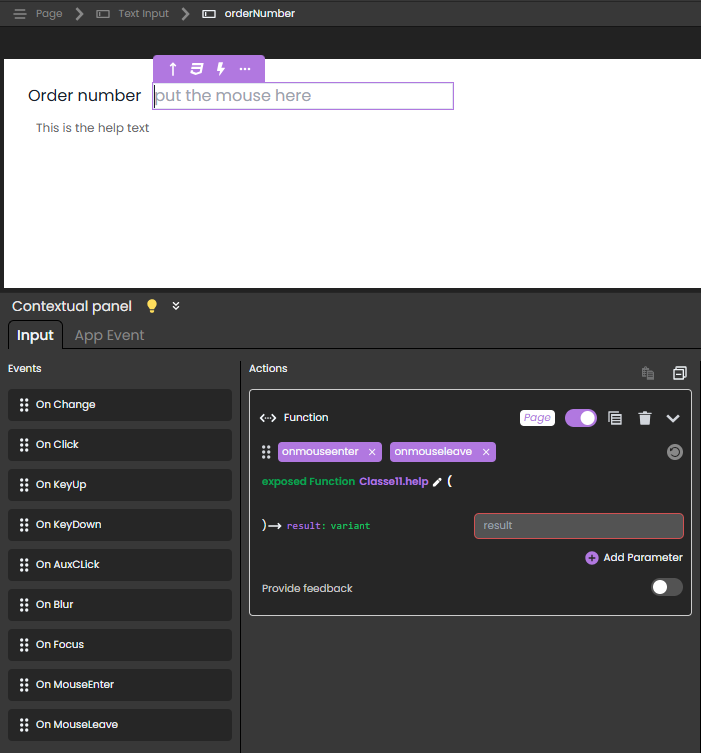
In this scenario:
- The Text input component has
orderNumberas Server side reference.
- The Text component has
helpOn_orderNumberas Server side reference.
- The exposed function
help()is attached to both theonmouseenterandonmouseleaveevents and contains the following code:
shared singleton Class constructor()
exposed Function help()

	var event : Object
	var myForm : 4D.WebForm
	var componentRef : Text

	myForm:=web Form
	event:=web Event
	componentRef:=event.caller

	Case of
		: (event.eventType="onmouseenter")  // event is onmouseenter
			myForm["helpOn_"+componentRef].show()  // show the help on "orderNumber" by showing
			// the text component with reference "helpOn_orderNumber"
		: (event.eventType="onmouseleave")  // event is onmouseleave
			myForm["helpOn_"+componentRef].hide()  // hide the help on orderNumber

	End case
To open the web page with the help on orderNumber hidden, you can associate this function to the onload event of the web page:
exposed function hideOnLoad()
	webForm.helpOn_orderNumber.hide()
Veja também
Web Form
WebForm class
WebFormItem class
Propriedades
| Número de comando | 1734 |
| Thread safe | não |