Force Login
With Qodly Studio for 4D, the "force login" mode allows you to control the number of opened web sessions that require 4D Client licenses. You can also logout the user at any moment to decrement the number of retained licenses.
Configuration
Make sure the "force login" mode is enabled for your 4D application in the Roles and Privileges page, using the Force login option:
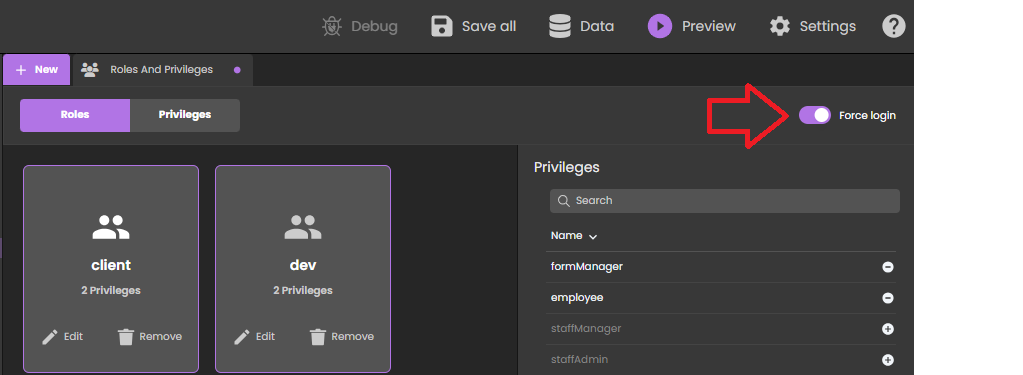
You can also set this option directly in the roles.json file.
You just need then to implemented the authentify() function in the datastore class and call it from the Qodly page. A licence will be consumed only when the user is actually logged.
When the legacy login mode (deprecated as of 4D 20 R6) is enabled, any REST request, including the rendering of an authentication Qodly page, creates a web session on the server and gets a 4D Client license, whatever the actual result of the authentication. For more information, refer to this blog post that tells the full story.
Example
In a simple Qodly page with login/password inputs, a "Submit" button calls the following authentify() function we have implemented in the DataStore class:
- 4D
- QodlyScript
exposed Function authentify($credentials : Object) : Text
	var $salesPersons : cs.SalesPersonsSelection
	var $sp : cs.SalesPersonsEntity

	$salesPersons:=ds.SalesPersons.query("identifier = :1"; $credentials.identifier)
	$sp:=$salesPersons.first()

	If ($sp#Null)
		If (Verify password hash($credentials.password; $sp.password))
			Session.clearPrivileges()
			Session.setPrivileges("") //guest session

			return "Authentication successful"
		Else
			return "Wrong password"
		End if
	Else
		return "Wrong user"
	End if
exposed function authentify(credentials : Object) : string
	var salesPersons : cs.SalesPersonsSelection
	var sp : cs.SalesPersonsEntity

	salesPersons=ds.SalesPersons.query("identifier = :1", credentials.identifier)
	sp = salesPersons.first()

	if (sp!=Null)
		if (verifyPasswordHash(credentials.password, sp.password))
			session.clearPrivileges()
			session.setPrivileges("") //guest session

			return "Authentication successful"
		else
			return "Wrong password"
		end
	else
		return "Wrong user"
	end
This call is accepted and as long as the authentication is not successful, Session.setPrivileges() is not called, thus no license is consumed. Once Session.setPrivileges() is called, a 4D client licence is used and any REST request is then accepted.
Logout
When the "force login" mode is enabled, Qodly Studio for 4D allows you to implement a logout feature in your application.
To logout the user, you just need to execute the Logout standard action from the Qodly page. In Qodly Studio, you can associate this standard action to a button for example:

Triggering the logout action from a web user session has the following effects:
- the current web user session loses its privileges, only descriptive REST requests are allowed,
- the associated 4D license is released,
- the
Session.storageis kept until the web session inactivity timeout is reached (at least one hour). During this period after a logout, if the user logs in again, the same session is used and theSession.storageshared object is available with its current contents.